Get started
Authentication
To use the Storage Access API, you need to authenticate with an access token:
-
For user-service interactions, copy your user access token directly from a given application in Guidewire Home.
-
For service-to-service interactions, use your client credentials to get a token with specific scopes. For details, see Before you begin.
Before you begin
If you use the service-to-service interactions with the Storage Access API for the first time:
- Decide which scopes you need.
- Register the API in Guidewire Hub. For details on how to register the API, see Access Cloud Platform APIs in the Cloud Platform documentation.
If you already registered the Storage Access API and obtained the necessary credentials:
- Get an access token with the supported scopes.
- Use the generated token to make an authorized call.
User access token
To authenticate with a user access token, you must be in the user group managed by Guidewire Hub. For details, see Access Cloud Platform apps and services.
An access token expires after 60 minutes.
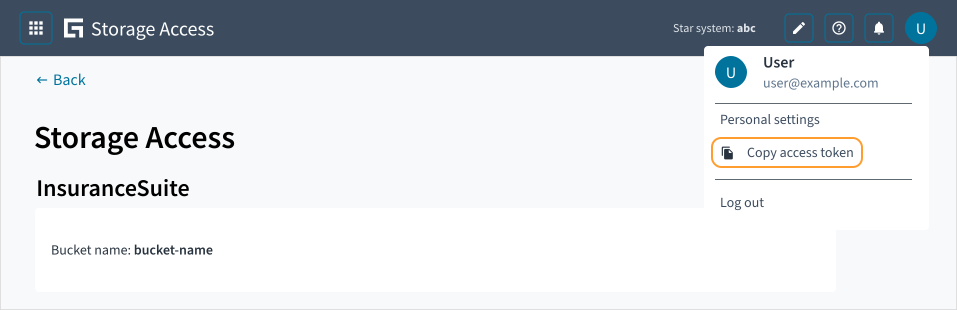
You can get an access token directly from Guidewire Home:
-
Log in to Guidewire Home.
In Guidewire Home, from Apps
 , select Storage Access or select it from your pinned apps.
-
Select your profile.
-
Select
 Copy access token.
This action copies an access token to your clipboard.
Supported scopes
The Storage Access API supports the following scopes:
| Scope | Description |
|---|---|
storage.accesskeys.write, tenant.${TENANT_ID} | Create, update, and delete access keys. |
storage.accesskeys.read, tenant.${TENANT_ID} | Get access key details. |
storage.users.write, tenant.${TENANT_ID} | Create, update, and delete users. |
storage.users.read, tenant.${TENANT_ID} | Get user details. |
storage.roles.write, tenant.${TENANT_ID} | Create, update, and delete roles. |
storage.roles.read, tenant.${TENANT_ID} | Get role details. |
Where ${TENANT_ID} is your unique customer name.
Get an access token with supported scopes
To get an access token with scopes, you need to authenticate with Guidewire Hub using your client ID and client secret.
Send the following POST request:
curl -s --location --request POST ${GWHUB_URL} \
    --data-urlencode "grant_type=client_credentials" \
    --data-urlencode "scope=${SCOPE} tenant.${TENANT_ID}" \
    --data-urlencode "client_id=${GWHUB_CLIENT_ID}" \
    --data-urlencode "client_secret=${GWHUB_CLIENT_SECRET}"
Where:
${GWHUB_URL}depends on your region. Use one of the following:
| Region | URL |
|---|---|
| AMER | https://guidewire-hub.okta.com/oauth2/aus11vix3uKEpIfSI357/v1/token |
| BRAZIL | https://guidewire-hub.okta.com/oauth2/aus11vix3uKEpIfSI357/v1/token |
| CANADA | https://guidewire-hub.okta.com/oauth2/aus11vix3uKEpIfSI357/v1/token |
| EMEA | https://guidewire-hub-eu.okta.com/oauth2/ausc2q01c40dNZII0416/v1/token |
| SWITZERLAND | https://guidewire-hub-eu.okta.com/oauth2/ausc2q01c40dNZII0416/v1/token |
| APAC | https://guidewire-hub-apac.okta.com/oauth2/ausbg05gfcTZQ7bpH3l6/v1/token |
| JAPAN | https://guidewire-hub-apac.okta.com/oauth2/ausbg05gfcTZQ7bpH3l6/v1/token |
${SCOPE}must includetenant.${TENANT_ID}and at least one of the supported scopes. For details on how to get or extend scopes, see Access Cloud Platform APIs.${GWHUB_CLIENT_ID}is a unique identifier for the application that you use to obtain a token from Guidewire Hub. For details on how to get the client ID, see Access Cloud Platform APIs.${GWHUB_CLIENT_SECRET}is a secret for the application that you use to obtain a token from Guidewire Hub. For details on how to get the client secret, see Access Cloud Platform APIs.
The response contains a JSON object with the requested access token. For example:
{
  "token_type": "Bearer",
  "expires_in": 3600,
  "access_token": "xxxxxxxx",
  "scope": "storage.accesskeys.write storage.accesskeys.read tenant.${TENANT_ID}"
}
An access token expires after 60 minutes.
Make an authenticated call
To authenticate API requests, add the obtained access token to an Authorization header:
Authorization: Bearer ${ACCESS_TOKEN}
For example:
curl -s --location --request GET "${STORAGE_SERVICE_API}" \
    -H "Accept: application/json" \
    -H "Content-Type: application/json" \
    -H "Authorization: Bearer ${ACCESS_TOKEN}"
Base URLs
Depending on your region, use one of the following base URLs:
| Region | URL |
|---|---|
| AMER | https://storageservice.api.omega2-andromeda.guidewire.net |
| BRAZIL | https://storageservice.api.omega2-sculptor.guidewire.net |
| CANADA | https://storageservice.api.omega2-butterfly.guidewire.net |
| EMEA | https://storageservice.api.omega2-cartwheel.guidewire.net |
| SWITZERLAND | https://storageservice.api.omega2-whirlpool.guidewire.net |
| APAC | https://storageservice.api.omega2-circinus.guidewire.net |
| JAPAN | https://storageservice.api.omega2-milkyway.guidewire.net |
When the documentation refers to {baseUrl}, replace it with the correct URL for your region.