Step progress bar
Usage
Overview
The step progress bar displays the number of steps a user must complete to finish a task. For example, to complete a profile, a user must provide information like qualifications and home details. These can be set as mandatory steps before the task is considered complete.
When to use
To display the number of steps required to complete a task.
When not to use
- If you don’t know how many steps are required to complete the task. Instead, use a simple progress bar.
- If your process includes sub-steps. Instead, use a phase progress bar.
Formatting
Anatomy
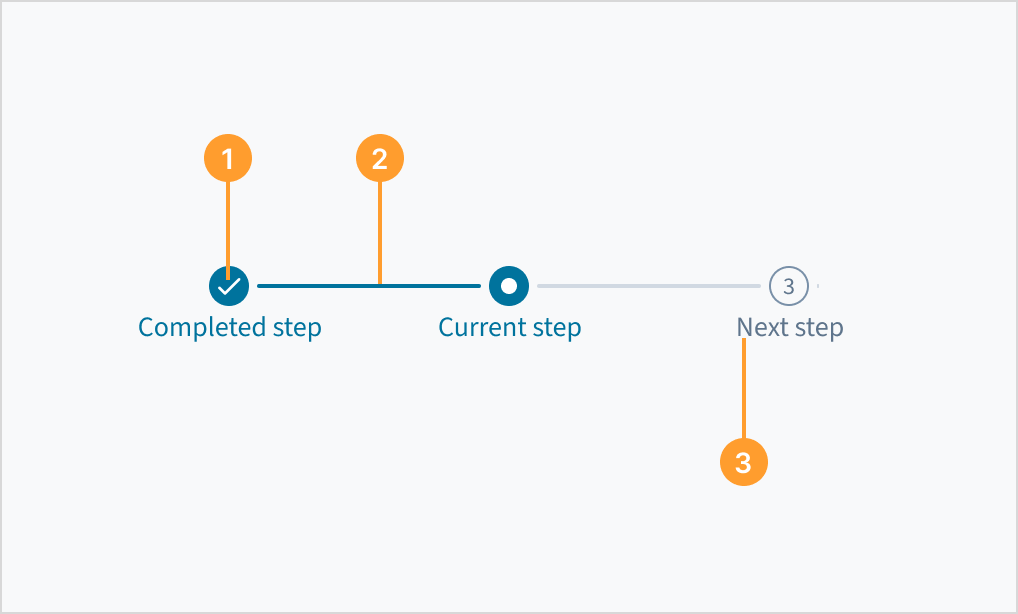
The step progress bar consists of the following elements:
- Step icon or number: Indicates whether a step is completed, in progress, or pending.
- Bar: Indicates the connection between steps, showing completed steps and the current step.
- Step label: Establishes context and communicates what the user will accomplish in each step (for example, “Submit payment”).
Best practices
- Ensure the steps are displayed in a logical order, from start to end (left to right).
- Users must be able to return to previous steps for review and to update details.
- Ensure the steps are logically grouped, simple, and clear to support understanding.
- Make sure all steps are visible.
- Keep the steps to a minimum of 3 and a maximum of 7.
Content
General writing guidelines
- Use sentence case for all aspects of designing Guidewire product interfaces. Don't use title case.
- Use present tense verbs and active voice in most situations.
- Use common contractions to lend your copy a more natural and informal tone.
- Use plain language. Avoid unnecessary jargon and complex language.
- Keep words and sentences short.
Steps layout label
- Keep labels short and clearly identify the step.
- Use sentence case for labels. Capitalize the first word of a phrase and any proper nouns. For additional guidance on how to implement sentence case, see Capitalization.
- When using tooltips in conjunction with a steps layout, tooltip content must only contain one or two words.
Interactions
Keyboard
Each active step can be focused on using the keyboard.
Accessibility
The steps layout comprises a series of steps to communicate completion status. It uses the HTML5 landmark <nav> tag and each step in the process is assigned the WAI-ARIA role of 'link'. The visual textual value is also included within an aria-label attribute.
The contrast ratio of textual elements against their background is above 4.5:1 as per WCAG 2.1 AA requirements. Non-textual content that needs to convey meaning (such as icons and keyboard focus visibility) has a contrast ratio of at least 3:1 with its adjacent colors. All content is visible and functional up to and including 400% without requiring scrolling in two dimensions.
This component has been validated to meet the WCAG 2.1 AA accessibility guidelines. However, changes made by the content author can affect accessibility conformance.
Ensure that, if using links, each step directs the user to the correct destination.